

Extra Effort Required to Find Some Google Information
April 10, 2025
 Dinobaby says, “No smart software involved. That’s for “real” journalists and pundits.
We are plugging along on a little project. As part of our checking assorted publicly accessible sources for being publicly accessible, we were delighted to verify that Exploit Database is alive and kicking. Plus, it appears to be current as of August 2024.
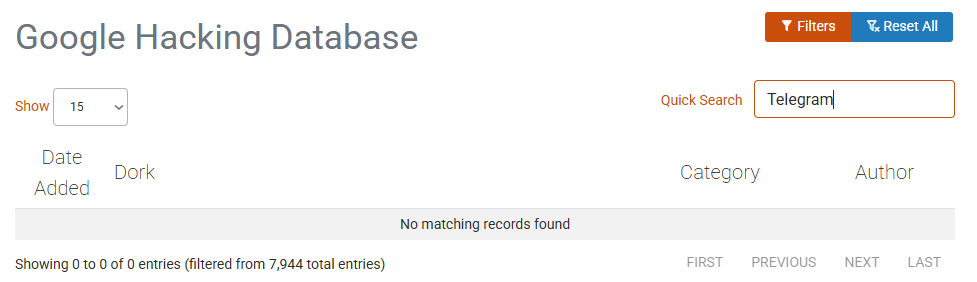
Since we are doing some poking around for information related to the newly-almost-free Pavel Durov, we were interested in the Google Hacking Database. You can locate that list of “Google dorks” at this link. The most recent additions or dorks provide some information about finding files containing passwords.
Here’s the little discovery. None of the almost 8,000 dorks are Telegram specific. However, many of the methods can be applied to Pavel Durov’s interesting outfit. We tried a handful and learned that Google’s index either is filtering Telegram-related content or simply does not make much of an effort to provide pointers to certain types of public Telegram information.
How does an analyst or researcher locate current, comprehensive information about bots, Groups, Channels, and third-party specialized services for that platform? That is an excellent question which leads to some Russian resources which are often presented in Russian, semi low profile outfits like Forbidden Stories.
Net net: OSINT professionals depend on Google. However, certain large services engaged in a wide range of activities require pushing beyond the Google and its ever-helpful smart software.
Stephen E Arnold, April 10, 2025
Read AI Implements AI Into Enterprise Search
April 3, 2025
Enterprise search is an essential tool for an organization to function. There have been major shifts in enterprise search, including more accurate search results, and ability to search across multiple platforms. The Seattle startup Read AI wants to be the next enterprise search revolution says Geek Wire: “Seattle Startup Takes A Swing At Enterprise Search With New AI-Fueled Discovery Tool.”
There have been major upgrades in enterprise search before, including AI, but Read AI is doing it at level not before seen. The startup from Seattle began in 2021 with sentiment and engagement products for meetings. Later Read AI developed software tools that analyzed information across various communication channels. Now their latest product upgrade is for enterprise search that enables users to quickly locate and access information across terabytes of data and applications.
Read AI’s enterprise search tool upgrade is for Microsoft Copilot:
“Users can choose what data is discoverable. Search Copilot gets “smarter” as more workers add more data, and allows for collaboration. The new tool can also nudge users to take action based on past interactions with colleagues or customers.
The product is free to use with certain limits. Read AI CEO David Shim said reducing barriers is a key differentiator.
“People haven’t been able to understand the value of enterprise search because they haven’t had access to it,” he said.
Shim said Read AI’s ability to determine what’s important for an individual user also gives Search Copilot an edge over other AI search tools.”
Read AI wants to differentiate itself from its rivals, built-in-platform tools from Zoom, Google, and Microsoft. Read AI does have an advantage over out-of-the-box solutions, because experience tells us those tools stink. Proprietary developed tools are usually better because they’re specifically designed to enhance a specific feature, while out-of-the-box solutions are designed to with the “it’s okay to get by” mentality.
While Read AI made a smart move to upgrade Copilot with the latest AI technology, someone else would have done it eventually.
Whitney Grace, April 3, 2025
Old School Search: Scrunch Can Help You
March 25, 2025
Google, DuckDuckGo, Bing, and other search engines have incorporated AI into their search algorithms. AI, however, remains regulated to generative text and chatbots. It’s also doing very little to assist companies with their Web presences Tech Crunch shares how one startup wants to change that: “Scrunch AI Is Helping Companies Stand Out In AI Search.”
Scrunch AI developed a platform that assists companies with auditing and optimizing how their appear on AI search platforms. The platform shows how a company’s online information interacts with AI Web crawlers. Scrunch also funds inaccuracies and gaps in information.
The CEO and co-founder of Crunch AI Chris Andrew said he got the idea for the platform when he realized that he expected ChatGPT to do the browsing for him. He shared the idea with CMOs who noticed that their companies received high-quality traffic from AI search engines. The rub, however, was that the companies received different results from different platforms.
While there are companies that concentrate o this task, he says Scrunch goes further than then:
“Andrew thinks his startup stands out thanks to its focus on the customer journey as opposed to just how a brand shows up in initial search results. He feels the company is also taking it a step further by not just focusing on search results by a human through an AI search engine, but rather on searches performed by AI agents. ‘I think people were like, ‘How do we use AI to make our website better?’ And my mindset was like, ‘Your website’s going to need to be for an agent or crawler in the future,’” Andrew said. ‘That theory has kind of really played out with our customer base at the enterprise level saying our brand is no longer what we say it is. It’s what ChatGPT, Gemini, Siri, Google AI Overviews say it is.’”
Consistency and accuracy is important in this digital age. Andrew has a great idea but will Scrunch optimize search engine AI or will it generate AI slop?
Whitney Grace, March 25, 2025
Another New Search System with AI Too
March 7, 2025
There’s a new AI engine in town down specifically designed to assist with research. The Next Web details the newest invention that comes from a big name in the technology industry: “Tech mogul Launches AI Research Engine Corpora.ai.” Mel Morris is a British tech mogul and the man behind the latest research engine: Corpora.ai.
Morris had Corpora.ai designed to provided in-depth research from single prompts. It is also an incredibly fast engine. It can process two million documents per second. Corpora.ai works by reading a prompt then the AI algorithm scans information, including legal documents, news articles, academic papers, and other Web data. The information is then compiled into summaries or reports.
Morris insists that Corpora.ai is a research engine, not a search engine. He invested $15 million of his personal fortune into the project. Morris doesn’t want to compete with other AI projects, instead he wants to form working relationships:
“His funding aims to create a new business model for LLMs. Rather than challenge the leading GenAI firms, Corpora plans to bring a new service to the sector. The research engine can also integrate existing models on the market. ‘We don’t compete with OpenAI, Google, or Deepseek,’ Morris said. ‘The nice thing is, we can play with all of these AI vendors quite nicely. As they improve their models, our output gets better. It’s a really great symbiotic relationship.’
Mel Morris is a self-made businessman who is the former head of King, the Candy Crush game creator. He also owned and sold the dating Web site, uDate. He might see a return on his Corpora.ai investment .
Whitney Grace, March 7, 2025
Microsoft Still Searching after All These Years
January 28, 2025
Finally, long-suffering Windows users will get a better Windows Search. But only if they are willing to mix AI with their OS. The Register reports, "Improved Windows Search Arrives… But Only for Copilot+ PCs." Reporter Richard Speed writes:
"Windows Search has been the punchline to many a Windows joke over the years. The service is intended to provide an easy way of finding content on a local machine, and has previously been mocked for being slow and unreliable. It was blamed for various failures, from causing high CPU usage and toppling over when bits of infrastructure had issues, to tripping up other applications, such as Outlook. Microsoft is making improvements in the latest Dev Channel release – although only for Copilot+ PCs – and is ‘introducing semantic indexing along with traditional indexing.’ This means typing some natural phrases into the Windows search box on the taskbar or searching in File Explorer, which will produce a list of documents that include items close to or related to the search terms."
For now, Windows Search continues to only work on files stored locally. However, Microsoft plans to expand that to documents in the cloud in a future release. The firm promises "no data gathered during the indexing is sent to the company or used to train AI models." Sure.
How many search systems does Microsoft have? How many work as users expect? Our suggestion: Use Everything search. Not only does that freeware tool work well, it does not require one to embrace AI to function. Oh, Microsoft, keep searching. One day you may find a way to locate information in a Windows system. Maybe?
Cynthia Murrell, January 28, 2025
AI Search Engine from Alibaba Grows Apace
January 15, 2025
 Prepared by a still-alive dinobaby.
The Deepseek red herring has been dragged across the path of US AI innovators. A flurry of technology services wrote about Deepseek’s ability to give US smart software companies a bit of an open source challenge. The hook, however, was not just the efficacy of the approach. The killer message was, “Better, faster, and cheaper.” Yep, cheaper, the concept which raises questions about certain US outfits burning cash in units of a one billion dollars with every clock tick.

A number of friendly and lovable deer are eating the plants in Uncle Sam’s garden. How many of these are living in the woods looking for a market to consume? Thanks OpenAI, good enough.
Now Alibaba is coming for AI search. The Chinese company crows on PR Newswire, "Alibaba’s Accio AI Search Engine Hits 500,000 SME User Milestone." Sounds like a great solution for US businesses doing work for the government. The press release reveals:
"Alibaba International proudly announces that its artificial intelligence (AI)-powered business-to-business (B2B) search engine for product sourcing, Accio, has reached a significant milestone since its launch in November 2024, currently boasting over 500,000 small and medium-sized enterprise (SME) users. … During the peak global e-commerce sales seasons in November and December, more than 50,000 SMEs worldwide have actively used Accio to source inspirations for Black Friday and Christmas inventory stocking. User feedback shows that the search engine helped them achieve this efficiently. Accio now holds a net promoter score (NPS) exceeding 50[1], indicating a high level of customer satisfaction. On December 13, 2024, the dynamic search engine was also named ‘Product of the Day’ on Product Hunt, a site that curates new products in tech, further cementing its status as an indispensable tool for SME buyers worldwide."
Well, good for them. And, presumably, for China ‘s information gathering program. Founded in 1999, Alibaba Group is based in Hangzhou, Zhejiang. One can ask many questions about Alibaba, including ones related to the company’s interaction with Chinese government officials. When a couple of deer are eating one’s garden vegetables, a good question to ask is, “How many of these adorable creatures live in the woods?” One does not have to be Natty Bumpo to know that the answer is, “There are more where those came from.”
Cynthia Murrell, January 15, 2025
Microsoft Grouses and Barks, Then Regrouses and Rebarks about the Google
December 23, 2024
 This blog post is the work of an authentic dinobaby. No smart software was used.
I spotted a reference to Windows Central, a very supportive yet “independent” explainer of Microsoft. That write up bounced around and a version ended up in Analytics India, an online publication from a country familiar to the Big Dogs at Microsoft and Google.

A stern mother tells her child to knock off the constant replays of a single dorky tune like “If I Knew You Were Comin’ I’d’ve Baked a Cake.” Thanks, Grok. Good enough.
The Analytics India story is titled “Google Makes More Money on Windows Than Microsoft, says Satya Nadella.” Let’s look at a couple of passages from the write up and then reflect on the “grousing” both giants in the money making department are sharing with anyone, maybe everyone.
Here’s the first snippet:
“Google makes more money on Windows than all of Microsoft,” Nadella said, discussing the company’s strategy to reclaim lost market share in the browser space.
I love that “lost market share”. Did Microsoft have market share in the browser space. Like Windows Phone, the Microsoft search engine in its many incarnations was not a click magnet. I heard when I did a teeny tiny thing for a Microsoft “specialist” outfit that Softies were running queries on Google and then reverse engineering what to index and what knobs to turn in order to replicate what Google’s massively wonderful method produced. True or false? Hey, I only know what I was told. Whatever Microsoft did in search failed. (How about that Fast Search & Transfer technology which powered alltheweb.com when it existed?)
I circled this statement as well:
Looking ahead, Nadella expressed confidence in Microsoft’s efforts to regain browser market share and promote its AI tools. “We get to relitigate,” he said, pointing to the opportunity to win back market share. “This is the best news for Microsoft shareholders—that we lost so badly that we can now go contest it and win back some share,” he said.
Ah, ha. “Lost so badly.” What an interesting word “relitigate.” Huh? And the grouse replay “win back market share.” What market share? Despite the ubiquity of the outstandingly wonderful Windows operating system and its baked in browser and button fest for Bing, exactly what is the market share.
Google is chugging along with about 90 percent Web search market share. Microsoft is nipping at Google’s heels with a robust four percent. Yandex is about two percent. The more likely scenario is that Yandex could under its new ownership knock Microsoft out of second place. Google isn’t going anywhere fast because the company is wrapped around finding information like Christiano Ronaldo holding one of his trophies.
What’s interesting about the Analytics India write up is what is not included in the article. For example:
- The cultural similarities of the two Big Dogs. The competition has the impact of a couple of high schoolers arguing in the cafeteria
- The lack of critical commentary about the glittering generalities the Microsoft Big Dog barks and rebarks like an annoyed French bulldog
- A total lack of interest in the fact that both companies are monopolies and that neither exists to benefit anyone other than those who hold shares in the respective companies. As long as there is money, search market share is nothing more than a money stream.
Will smart software improve the situation?
No. But the grouse and re-grouse approach to business tactics will be a very versatile rhetorical argument.
Stephen E Arnold, December 23, 2024
The Hay Day of Search Has a Ground Hog Moment
December 19, 2024
 This blog post is the work of an authentic dinobaby. No smart software was used.
I think it was 2002 or 2003 that I started writing the first of three editions of Enterprise Search Report. I am not sure what happened to the publisher who liked big, fat thick printed books. He has probably retired to an island paradise to ponder the crashing blue surf.
But it seems that the salad days of enterprise search are back. Elastic is touting semantics, smart software, and cyber goodness. IBM is making noises about “Watson” in numerous forms just gift wrapped with sparkly AI ice cream jimmies. There is a start up called Swirl. The HuggingFace site includes numerous references to finding and retrieving. And there is Glean.
I keep seeing references to Glean. When I saw a link to the content marketing piece “Glean’s Approach to Smarter Systems: AI, Inferencing and Enterprise Data,” I read it. I learned that the company did not want to be an AI outfit, a statement I am not sure how to interpret; nevertheless, the founder of Glean is quoted as saying:
“We didn’t actually set out to build an AI application. We were first solving the problem of people can’t find anything in their work lives. We built a search product and we were able to use inferencing as a core part of our overall product technology,” he said. “That has allowed us to build a much better search and question-and-answering product … we’re [now] able to answer their questions using all of their enterprise knowledge.”
And what happened to finding information? The company has moved into:
- Workflows
- Intelligent data discovery
- Problem solving
And the result is not finding information:
Glean enables enterprises to improve efficiency while maintaining control over their knowledge ecosystem.
Translation: Enterprise search.
The old language of search is gone, but it seems to me that “search” is now explained with loftier verbiage than that used by Fast Search & Transfer in a lecture delivered in Switzerland before the company imploded.
Is it now time for write the “Enterprise Knowledge Ecosystem Report”? Possibly for someone, but it’s Ground Hog time. I have been there and done that. Everyone wants search to work. New words and the same challenges. The hay is growing thick and fast.
Stephen E Arnold, December 19, 2024
The Fatal Flaw in Rules-Based Smart Software
December 17, 2024
 This blog post is the work of an authentic dinobaby. No smart software was used.
As a dinobaby, I have to remember the past. Does anyone know how the “smart” software in AskJeeves worked? At one time before the cute logo and the company followed the path of many, many other breakthrough search firms, AskJeeves used hand-crafted rules. (Oh, the reference to breakthrough is a bit of an insider joke with which I won’t trouble you.) A user would search for “weather 94401” and the system would “look up” in the weather rule the zip code for Foster City, California, and deliver the answer. Alternatively, I could have when I ran the query looked out my window. AskJeeves went on a path painfully familiar to other smart software companies today: Customer service. AskJeeves was acquired by IAC Corp. which moved away from the rules-based system which was “revolutionizing” search in the late 1990s.

Rules-based wranglers keep busy a-fussin’ and a-changin’ all the dang time. The patient mule Jeeves just wants lunch. Thanks, MidJourney, good enough.
I read “Certain Names Make ChatGPT Grind to a Halt, and We Know Why.” The essay presents information about how the wizards at OpenAI solve problems its smart software creates. The fix is to channel the “rules-based approach” which was pretty darned exciting decades ago. Like the AskJeeves’ approach, the use of hand-crafted rules creates several problems. The cited essay focuses on the use of “rules” to avoid legal hassles created when smart software just makes stuff up.
I want to highlight several other problems with rules-based decision systems which are far older in computer years than the AskJeeves marketing success in 1996. Let me highlight a few which may lurk within the OpenAI and ChatGPT smart software:
- Rules have to be something created by a human in response to something another (often unpredictable) human did. Smart software gets something wrong like saying a person is in jail or dead when he is free and undead.
- Rules have to be maintained. Like legacy code, setting and forgetting can have darned exciting consequences after the original rules creator changed jobs or fell into the category “in jail” or “dead.”
- Rules work with a limited set of bounded questions and answers. Rules fail when applied to the fast-changing and weird linguistic behavior of humans. If a “rule” does know a word like “debanking”, the system will struggle, crash, or return zero results. Bummer.
- Rules seem like a great idea until someone calculates how many rules are needed, how much it costs to create a rule, and how much maintenance rules require (typically based on the cost of creating a rule in the first place). To keep the math simple, rules are expensive.
I liked the cited essay about OpenAI. It reminds me how darned smart today’s developers of smart software are. This dinobaby loved the article. What a great anecdote! I want to say, “OpenAI should have “asked Jeeves.” I won’t. I will point out that IBM Watson, the Jeopardy winner version, was rules based. In fact, rules are still around, and they still carry like a patient donkey the cost burden.
Stephen E Arnold, December 17, 2024
Europe Wants Its Own Search System: Filtering, Trees, and More
November 20, 2024
 This essay is the work of a dumb dinobaby. No smart software required.
I am not going to recount the history of search companies and government entities building an alternative to Google. One can toss in Bing, but Google is the Big Dog. Yandex is useful for Russian content. But there is a void even though Swisscows.com is providing anonymity (allegedly) and no tracking (allegedly).
Now a new European solution may become available. If you remember Pertimm, you probably know that Qwant absorbed some of that earlier search system’s goodness. And there is Ecosia, a search system which plants trees. The union of these two systems will be an alternative to Google. I think Exalead.com tried this before, but who remembers European search history in rural Kentucky?
“Two Upstart Search Engines Are Teaming Up to Take on Google” report:
The for-profit joint venture, dubbed European Search Perspective and located in Paris, could allow the small companies and any others that decide to join up to reduce their reliance on Google and Bing and serve results that are better tailored to their companies’ missions and Europeans’ tastes.
A possible name or temporary handle for the new search system is EUSP or European Search Perspective. What’s interesting is that the plumbing will be provided by a service provider named OVH. Four years ago, OVHcloud became a strategic partner of … wait for it … Google. Apparently that deal does not prohibit OVH from providing services to a European alternative to Google.
Also, you may recall that Eric Schmidt, former adult in the room at Google, suggested that Qwant kept him awake at night. Yes, Qwant has been a threat to Google for 13 years. How has that worked out? The original Qwant was interesting with a novel way of showing results from different types of sources. Now Qwant is actually okay. The problem with any search system, including Bing, is that the cost of maintaining an index containing new content and refreshing or updating previously indexed content is a big job. Toss in some AI goodness and cash burning furiously.
“Google” is now the word for search whether it works or does not. Perhaps regulatory actions will alter the fact that in Denmark, 99 percent of user queries flow to Google. Yep, Denmark. But one can’t go wrong with a ballpark figure like 95 percent of search queries outside of China and a handful of other countries are part of the Google market share.
How will the new team tackle the Google? I hope in a way that delivers more progress than Cogito. Remember that? Okay, no problem.
PS. Is a 13-year-old company an upstart? Sigh.
Stephen E Arnold, November 20, 2024
-

- Subscribe to Beyond Search
Feature archive
News archive

-


